

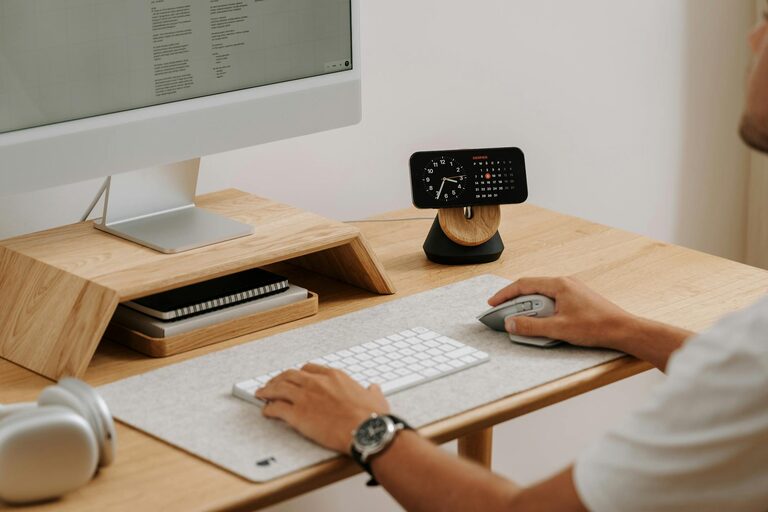
Creating a dedicated home office space that balances comfort and productivity is essential in today’s work-from-home culture. Whether you’re working full-time remotely or just need a spot for occasional tasks, setting up a well-designed workspace can make a significant difference in your focus, wellbeing, and efficiency.
In this post, we’ll explore practical tips to help you create a home office that supports both your comfort and productivity.
Choose the Right Location
The first step in setting up an effective home office is selecting the best location within your home.
– Quiet and Private: Ideally, pick a room or corner that is quiet and away from household noise. A bedroom corner, spare room, or a nook near a window can all work.
– Natural Light: Position your desk near a window to take advantage of natural light. Good daylight reduces eye strain and boosts mood and energy.
– Space to Move: Ensure the area is spacious enough to accommodate your desk, chair, and storage, with room to stretch or move around comfortably.
Invest in Ergonomic Furniture
Comfort plays a big role in productivity. Choosing the right furniture supports your posture and reduces discomfort during long working hours.
– Office Chair: Select an adjustable chair that provides proper lumbar support. Your feet should rest flat on the floor, and your knees should be at a 90-degree angle.
– Desk Height: Your desk should allow your forearms to rest comfortably while typing, keeping wrists straight.
– Standing Options: Consider a desk that can switch between sitting and standing positions, helping you reduce fatigue and improve circulation.
Optimise Your Lighting
Proper lighting is critical in a home office to prevent eye strain and maintain alertness.
– Layer Lighting: Combine natural light with task lighting. A desk lamp with adjustable brightness and direction helps focus on specific tasks.
– Avoid Glare: Arrange your screen to avoid reflections from windows or overhead lights. Use curtains or blinds to control sunlight.
– Warm vs Cool Light: Use daylight bulbs (5000K-6500K) for task lighting as they mimic natural light and aid concentration.
Minimise Distractions
Maintaining focus requires reducing interruptions and clutter in your workspace.
– Declutter Regularly: Keep your desk clean and clutter-free, only leaving out essentials.
– Organise with Storage: Use shelves, drawers, and organisers to keep papers, cables, and stationery tidily stored.
– Noise Control: Use noise-cancelling headphones or play soft background music if ambient noise is an issue.
Personalise for Motivation and Comfort
Adding personal touches to your office can make it a pleasant space where you enjoy spending time.
– Inspirational Art: Hang motivational posters or artwork that inspires you.
– Plants: Houseplants improve air quality and create a calming atmosphere.
– Comfort Items: A cosy cushion, a small blanket, or a favourite mug can add a homely feel.
Manage Technology Efficiently
Your technology setup should be reliable and organised to support your workflow.
– Reliable Internet: Ensure your broadband connection is strong and stable. Use a wired connection if possible for better speed.
– Cable Management: Use clips, ties, or cable boxes to keep cords organised and avoid tangling.
– Tech Ergonomics: Position your screen at eye level about an arm’s length away to reduce neck strain.
Set Boundaries and Routines
A productive home office is not just about physical space but also about mindset and discipline.
– Work Hours: Define clear working hours and stick to them to maintain work-life balance.
– Breaks: Take regular short breaks to stretch and rest your eyes. The 20-20-20 rule suggests looking at something 20 feet away for 20 seconds every 20 minutes.
– Separate Spaces: When possible, avoid working from your bed or sofa to mentally separate work time from rest time.
Keep Your Space Flexible
Your needs might change over time, so designing a flexible office space helps accommodate new challenges.
– Mobile Furniture: Use lightweight or multi-functional furniture that can be rearranged easily.
– Dual Purposes: If space is limited, create a fold-away desk or a convertible area that serves other household functions outside work hours.
– Future Proofing: Plan for additional equipment or storage so you can upgrade your setup without a major overhaul.
Conclusion
Creating a comfortable and productive home office doesn’t require a large budget or space, but thoughtful design and organisation. By choosing the right location, investing in ergonomic furniture, managing lighting and technology effectively, and establishing clear work routines, you can build a space that supports your best work and wellbeing.
Remember, your home office should be a place where you feel motivated and at ease — a space tailored to your personal needs and preferences. With these tips, you’re well on your way to creating a productive, comfortable, and enjoyable work environment at home.